IT recruitment can look deceptively simple from the outside.
A company has an open position. The recruiter searches for candidates, reviews resumes, schedules interviews, and helps close the vacancy.
But anyone who has worked on technical requirements knows that successful IT recruitment involves much more than searching for matching keywords.
An IT recruiter must understand the requirement, identify the correct candidate market, build an effective sourcing strategy, assess technical relevance, communicate with candidates, coordinate the hiring process, and continuously improve conversion ratios.
You do not need to become a programmer to recruit technology professionals. However, you must understand enough about technology to ask relevant questions, recognize suitable experience, and communicate confidently with candidates and hiring managers.
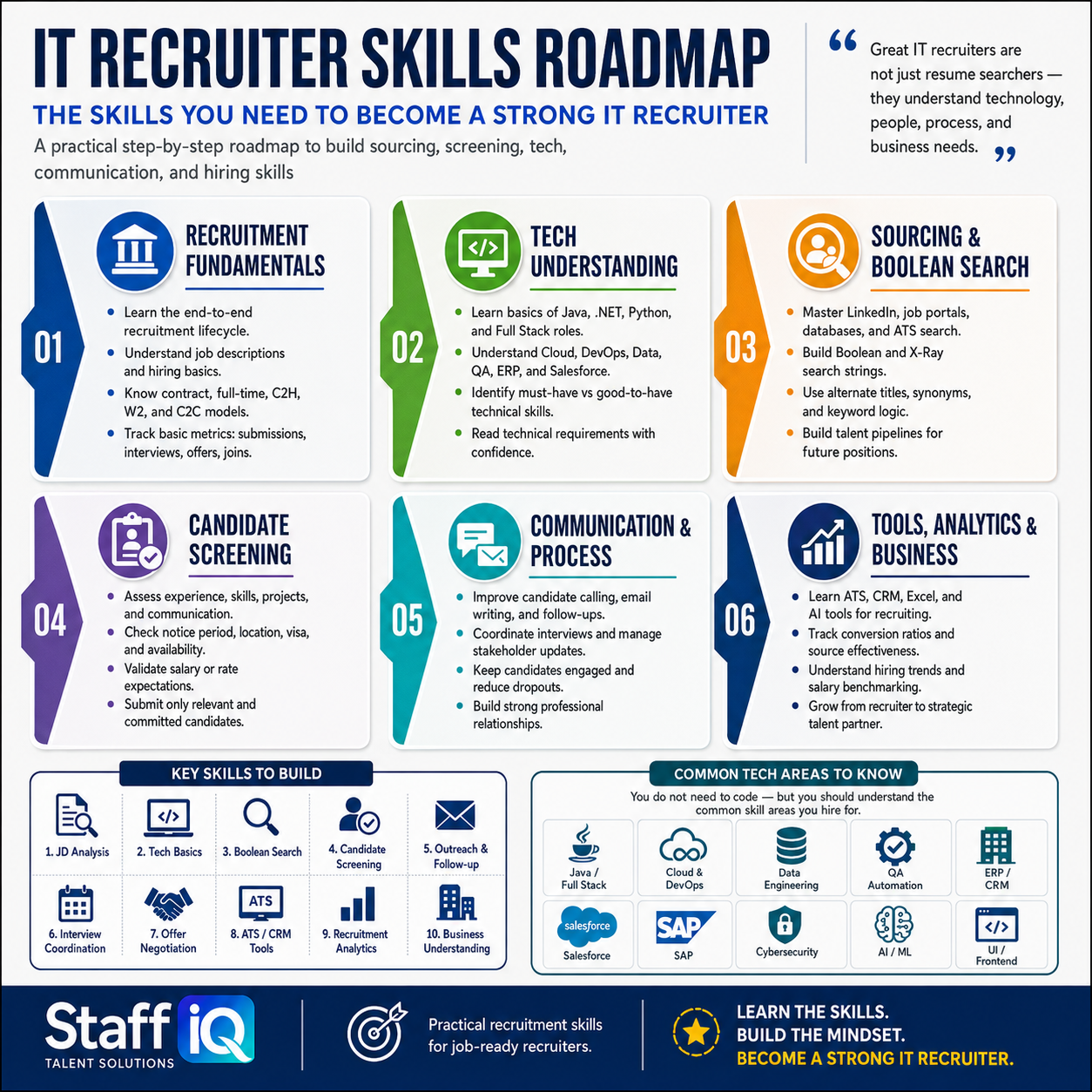
This practical IT Recruiter Skills Roadmap explains the six core areas you should develop to build a successful career in technical recruitment.
Great IT recruiters are not just resume searchers—they understand technology, people, process, and business needs.
What Does an IT Recruiter Do?
An IT recruiter helps organizations identify, evaluate, and hire professionals for technology-related positions.
Depending on the organization, an IT recruiter may work on positions such as:
- Software developers and engineers — full-stack, backend, frontend specialists
- Cloud and DevOps engineers — AWS, Azure, Kubernetes experts
- Data analysts and data engineers — analytics, pipeline, warehouse specialists
- QA and automation professionals — test automation, manual QA
- Cybersecurity specialists — InfoSec, network security, compliance
- ERP and CRM consultants — SAP, Salesforce, Oracle, Microsoft Dynamics
- Business analysts and project managers — technical and functional BAs
- AI and machine learning professionals — ML engineers, data scientists
- Technical support and infrastructure specialists — systems, network, database
The recruiter may handle the complete recruitment lifecycle or specialize in a particular part of it, such as sourcing, screening, interview coordination, recruitment operations, or client delivery.
Regardless of the exact role, the following six skill areas form the foundation of effective IT recruitment.
1. Recruitment Fundamentals
Before learning advanced sourcing tools or technical terminology, you need to understand how recruitment works from beginning to end.
The Recruitment Lifecycle (11 Steps)
A typical recruitment lifecycle includes:
Understanding the complete lifecycle helps you see how each activity affects the next stage. Weak requirement analysis leads to irrelevant sourcing. Irrelevant sourcing produces poor submissions. Poor submissions result in fewer interviews and longer hiring timelines.
How to Analyze a Job Description
Do not treat a job description as a simple list of keywords. Break it into clearly defined components:
- Job title and level — Senior? Mid? Junior? IC or management?
- Primary responsibilities — what will they do daily?
- Mandatory technical skills — non-negotiable must-haves
- Good-to-have skills — nice to have, learnable
- Required experience — years and context matter
- Industry or domain exposure — fintech? healthcare? e-commerce?
- Educational requirements — degree required or preferred?
- Location and work arrangement — remote, hybrid, or onsite?
- Compensation or bill rate — salary range or contract rate
- Employment type — full-time, contract, or contract-to-hire?
- Notice period or availability — how soon can they start?
- Work authorization — USC, GC, visa sponsorship needed?
You should also identify what is unclear, unrealistic, or missing and raise those questions before beginning the search.
Don't just read the JD. Ask: "What problem will this person solve?" If the hiring manager can't answer that clearly, neither can your candidates.
2. Technical Understanding
One of the biggest concerns new IT recruiters have is:
"How can I recruit technical candidates if I do not know coding?"
The answer is simple: you do not need to write code, but you must learn how technical roles, skills, and projects connect.
Your goal is not to evaluate candidates like a senior engineer. Your goal is to conduct an informed initial assessment and recognize whether the candidate's experience is relevant to the requirement.
Common Technology Areas You Should Know
Build foundational knowledge of:
- Java, .NET, Python, and JavaScript — the big four languages
- Frontend, backend, and full-stack development — role categories
- Databases and data engineering — SQL, NoSQL, data pipelines
- Cloud platforms and DevOps — AWS, Azure, GCP, Kubernetes, Docker
- Manual testing and QA automation — Selenium, Jest, Cypress
- Cybersecurity — InfoSec, network security, application security
- Artificial intelligence and machine learning — ML engineers, data scientists
- ERP and CRM platforms — SAP, Salesforce, Microsoft Dynamics
- Mobile application development — iOS, Android, React Native
- Infrastructure and technical support — systems, network, database administration
For each area, learn:
- What the technology is used for
- Which roles commonly use it
- Related tools and frameworks
- Complementary skills
- Common job titles
- Typical project responsibilities
For example, when recruiting a Java developer, you may encounter related skills such as Spring Boot, microservices, REST APIs, SQL, Kafka, AWS, or Azure. You should understand how these technologies fit together even if you cannot use them yourself.
Mandatory vs. Preferred Skills
Not every skill mentioned in a job description carries equal importance.
Ask yourself:
- Which skills will the candidate use every day?
- Which skills are essential from the first day?
- Which skills can be learned after joining?
- Is a particular tool mandatory, or will experience with a similar tool work?
- How recently must the candidate have used the primary skill?
- What level of hands-on experience is expected?
This prevents you from rejecting suitable candidates simply because their resumes do not contain every keyword from the job description.
3. Sourcing and Boolean Search
Sourcing is not simply entering a job title into LinkedIn or a job portal. Effective sourcing begins with understanding what the ideal candidate may call themselves, which skills may appear on their profile, where they are likely to work, and what type of opportunity may motivate them to respond.
Convert the Requirement Into a Search Plan
Before running a search, identify:
- Primary and alternate job titles
- Mandatory skills and related keywords
- Industry keywords and domain terms
- Target companies and industries
- Preferred locations and work arrangements
- Experience level and years required
- Exclusion keywords (what to avoid)
Suppose you are hiring a DevOps Engineer. Relevant titles could include:
- DevOps Engineer
- Cloud DevOps Engineer
- Site Reliability Engineer (SRE)
- Platform Engineer
- Cloud Infrastructure Engineer
- Build and Release Engineer
Searching for only one job title could cause you to miss many qualified candidates.
Master Boolean Search
Boolean search helps combine or exclude keywords using operators:
- AND — both terms must appear
- OR — at least one term must appear
- NOT — exclude specific terms
- Quotation marks "" — exact phrase search
- Parentheses () — group related terms together
A simple Boolean search example:
("DevOps Engineer" OR "SRE" OR "Platform Engineer") AND (AWS OR Azure) AND (Kubernetes OR Docker) NOT (student OR unpaid)
The strongest search string is not necessarily the longest one. It is the one that produces the most relevant candidate pool.
4. Candidate Screening
Finding a resume is not the same as finding a suitable and interested candidate.
Screening helps determine whether the candidate possesses the required experience, understands the opportunity, is genuinely interested, and is likely to complete the hiring process.
Assess Complete Experience, Not Just Keywords
During screening, assess:
- Total and relevant experience — 10 years, but only 3 in the right area?
- Current and previous responsibilities — what did they actually do?
- Technical environment — what stack did they work with?
- Recent project experience — is it current or outdated?
- Depth of involvement — did they lead or follow?
- Industry or domain exposure — relevant to your requirement?
- Communication ability — can they articulate what they did?
- Career progression — are they growing or stagnant?
- Employment stability — frequent job changes?
- Reason for seeking a change — growth or escape?
Ask candidates to explain what they personally did instead of accepting a list of tools appearing on the resume.
Weak question: "Do you have experience with AWS?"
Better question: "How did you use AWS in your current project, and which services did you work with directly?"
The second question encourages the candidate to describe practical experience.
5. Communication and Process Management
Recruitment is a communication-intensive profession.
You may identify an excellent candidate, but poor outreach, delayed follow-ups, unclear information, or weak coordination can cause you to lose them.
Improve Your Candidate Outreach
Personalized outreach should explain:
- Why you selected this candidate specifically
- What the opportunity involves
- Why the role may be relevant to their experience
- Location, work arrangement, and timeline
- The next step in the process
- How they can respond
Avoid sending long job descriptions without context. Candidates are more likely to engage when they understand why you contacted them specifically.
Develop Professional Communication Skills
A strong recruiter should be able to:
- Introduce the opportunity clearly and compellingly
- Ask structured screening questions
- Listen without interrupting or being dismissive
- Explain the process and realistic timelines
- Address reasonable candidate concerns
- Document discussions accurately
- Send concise, actionable follow-up messages
Communication should be clear, respectful, and honest. Never promise an interview, offer, or outcome that you cannot control.
6. Recruitment Tools, Analytics, and Business Understanding
Recruiters who understand tools, data, and business needs are better positioned to grow into senior, strategic, and leadership roles.
Learn the Essential Recruitment Tools
Develop working knowledge of:
- Applicant tracking systems (ATS) — Workday, Greenhouse, Lever
- Candidate relationship management (CRM) — SmartRecruiters, Bullhorn
- LinkedIn and job portals — Indeed, Monster, Naukri
- Excel or Google Sheets — pipeline tracking and reporting
- Email and scheduling tools — Calendly, Outlook, Gmail
- Recruitment automation platforms — n8n, Zapier
- AI tools — ChatGPT, Claude for research, drafting, analysis
AI can help you summarize job descriptions, generate alternate titles, create screening questions, improve outreach, and organize information. However, it should support recruiter judgment—not replace it. Always verify AI-generated information before using it with candidates or clients.
Understand Key Recruitment Metrics
Important metrics include:
- Candidate response rate — % who respond to your outreach
- Sourcing-channel effectiveness — which channels produce quality candidates?
- Submission-to-shortlist ratio — how many submissions convert to interviews?
- Interview-to-offer ratio — how many interviews result in offers?
- Offer acceptance rate — what % of offers are accepted?
- Time to fill — how long from req to joining?
- Candidate drop-off rate — where are you losing candidates?
Consider this example: If you submit 20 candidates and only one is shortlisted, the issue may not be a lack of activity. It may indicate weak requirement understanding, poor screening, or an ineffective sourcing strategy. Metrics should help you improve decisions—not merely produce reports.
The 10 Core IT Recruiter Skills
An effective IT recruiter should gradually become confident in these ten areas:
| 1 | Job description analysis |
| 2 | Technology fundamentals |
| 3 | Boolean and X-Ray search |
| 4 | Candidate sourcing |
| 5 | Candidate screening |
| 6 | Outreach and follow-up |
| 7 | Interview coordination |
| 8 | Offer negotiation |
| 9 | ATS and CRM tools |
| 10 | Recruitment analytics and business understanding |
You do not need to master all ten skills immediately. Build them in the correct sequence and practise them consistently.
Your 90-Day IT Recruiter Learning Plan
Days 1–30: Build the Foundation
Focus on:
- The end-to-end recruitment lifecycle
- Job description analysis and requirement intake
- Common technical roles and terminology
- Employment types (W2, C2C, contract-to-hire)
- Basic candidate screening techniques
- Professional calling and email communication
Daily practice: Select one job description every day and identify its mandatory skills, preferred skills, alternative titles, and screening questions.
Days 31–60: Strengthen Sourcing and Screening
Focus on:
- Boolean operators and search syntax
- LinkedIn and job-portal search strategies
- Search-engine X-Ray techniques
- Resume evaluation and red flags
- Project-based screening questions
- Candidate motivation and availability checks
Weekly practice: Build at least three different searches for the same requirement. Compare the results and refine your keywords based on what works best.
Days 61–90: Improve Delivery and Analytics
Focus on:
- Talent pipeline management
- Interview coordination and scheduling
- Candidate engagement and follow-up
- Offer negotiation and closing
- ATS and CRM system mastery
- Recruitment metrics and reporting
- Hiring-manager and client communication
Weekly reviews: Start reviewing your conversion ratios each week. Identify one weakness in your recruitment funnel and work specifically on improving it.
Common Mistakes New IT Recruiters Make
❌ Depending entirely on keyword matching
Keywords can help you discover profiles, but they cannot explain the depth, relevance, or recency of a candidate's experience. Always go deeper.
❌ Searching before understanding the requirement
Starting the search too quickly often creates unnecessary work and irrelevant submissions. Spend time understanding what you're actually looking for first.
❌ Using only one job title
Candidates performing similar work may use very different titles across companies and industries. Expand your search across multiple title variations.
❌ Submitting candidates without confirming interest
A matching resume is not a qualified submission until the candidate understands and accepts the essential details of the opportunity.
❌ Stopping communication after submission
Recruitment continues through interviews, feedback, offers, notice periods, and joining. Your job doesn't end when you submit the candidate.
❌ Measuring activity without measuring results
A high number of calls or submissions means little if those activities do not produce shortlists, interviews, offers, and successful joins.
Key Takeaway: From Activity to Impact
The strongest IT recruiters are not necessarily those who know the most technical terms or make the most calls.
They are the ones who can:
- Connect the right requirement with the right candidate
- Manage the complete process with clarity and credibility
- Build trust with candidates, hiring managers, and clients
- Improve their funnel based on data, not guesswork
- Communicate professionally and treat candidates as humans
Start with recruitment fundamentals. Build your technology knowledge gradually. Practice your sourcing and screening skills on real job descriptions. Track your metrics. Iterate and improve.
The journey from recruiter to strategic talent partner takes time, but it starts with these six core skills.
Ready to Build Your IT Recruitment Career?
StaffIQ Talent Solutions helps aspiring and working recruiters develop practical, job-ready capabilities in IT recruitment, candidate sourcing, Boolean search, screening, and modern recruitment tools.
Start with our Advanced Candidate Sourcing using Google X-Ray course or book a 1:1 call to discuss your recruitment goals.