Every day, billions of people use software without thinking about how it was created.
You open a banking app, order food online, check your email, or attend a video meeting. The experience feels simple: tap a button and something happens.
But behind that button is months or years of planning, discussions, design work, code written by many developers, rigorous testing, careful deployment, and ongoing maintenance.
Professional software is never built by one developer who starts coding after hearing an idea. Instead, it follows a structured process called the Software Development Life Cycle, or SDLC.
What Is the Software Development Life Cycle?
SDLC is the structured journey that takes software from "We have an idea" to "People are successfully using this product."
Think of it like building a house:
- Decide what kind of house you want and what your budget is (Planning)
- Hire an architect to create detailed blueprints (Requirements & Design)
- Have construction workers build according to the plans (Development)
- Have an inspector verify everything meets standards (Testing)
- Move in and start living there (Deployment)
- Maintain the house over time, fixing issues as they arise (Maintenance)
SDLC does the same thing for software. It breaks a complex project into manageable phases, defines what needs to happen in each phase, assigns responsibilities, and ensures quality at every step.
Why Does SDLC Matter?
Without SDLC, companies face serious problems:
- Unclear requirements: Developers build features no one actually needs
- Cost overruns: Projects take much longer and spend much more than expected
- Quality issues: Bugs and failures reach customers instead of being caught beforehand
- Security risks: Vulnerabilities aren't identified or fixed
- Poor user experience: The software doesn't do what users actually need
- Maintenance nightmares: Code is messy, undocumented, and hard to improve
SDLC reduces these risks by creating a disciplined, repeatable process where everyone knows their role and quality is checked at every stage.
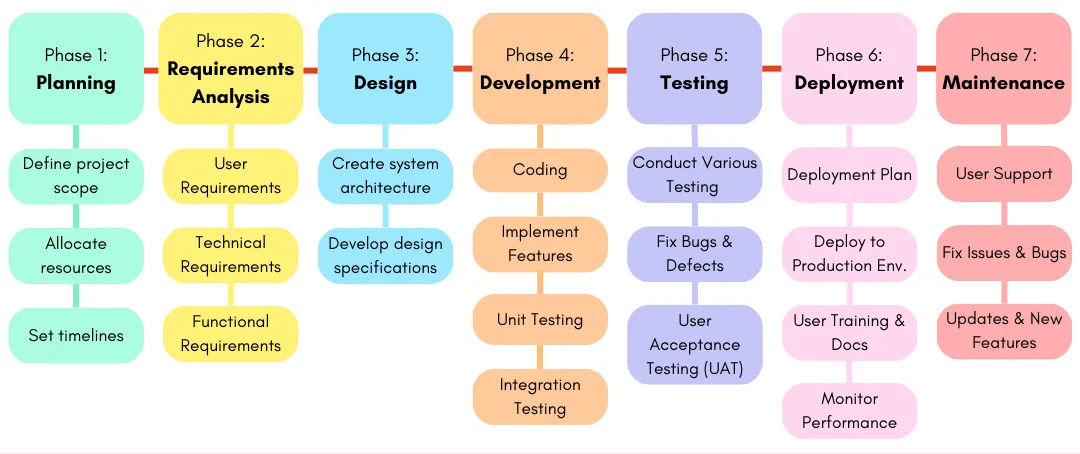
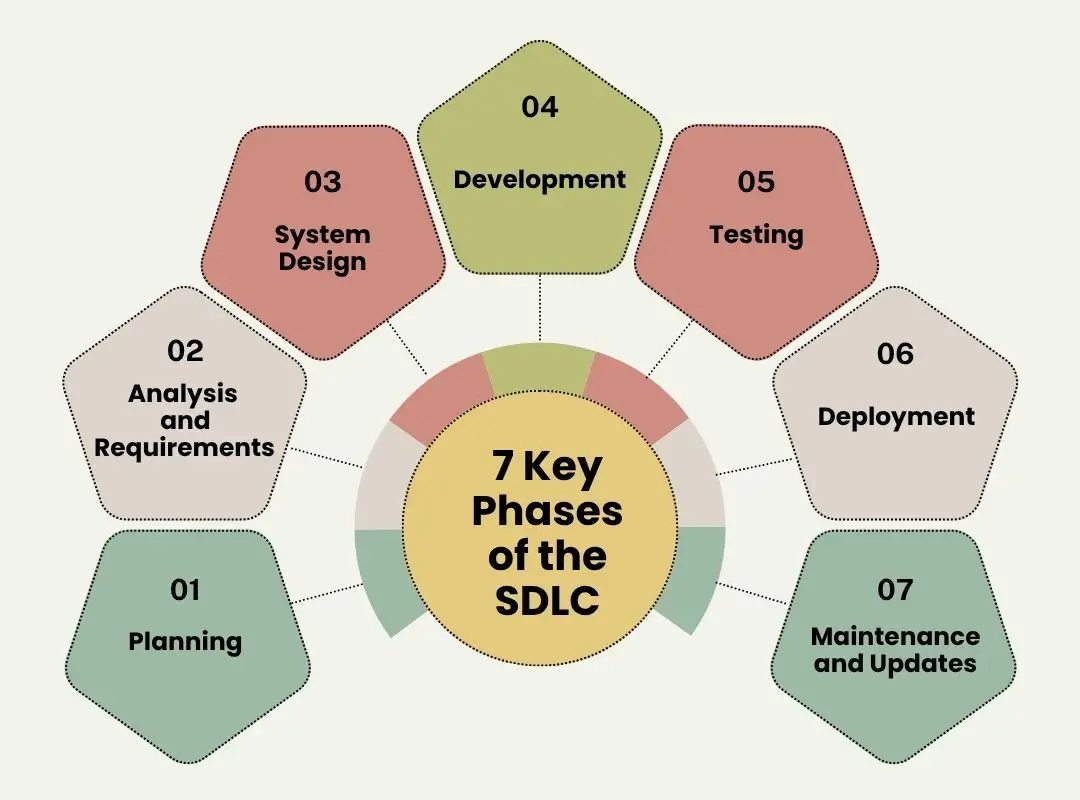
The 7 Main Phases of SDLC
Different companies use different names and sometimes combine phases, but the core activities are consistent. Here are the seven main phases:
Phase 1: Planning
Before any code is written, the organization asks fundamental questions:
- What problem are we solving?
- Is it worth solving?
- Do we have the resources?
- What's our budget and timeline?
- What are the risks?
During planning, stakeholders:
- Discuss business objectives and success criteria
- Identify target users and their needs
- Estimate budget and timeline
- Allocate resources (people, tools, infrastructure)
- Assess and plan for major risks
Example: A company decides to build a job-matching platform to help employers find qualified candidates more quickly. The project is given a budget of $500K, a 6-month timeline, and a team of 8 people.
Key Outputs from Planning
Project scope document (what will be built), budget estimate (how much it costs), timeline (how long it takes), resource plan (who does what), risk assessment (what could go wrong), and a formal go/no-go decision.
Phase 2: Requirements Gathering & Analysis
Once the project is approved, the team digs much deeper into what needs to be built:
- What exactly must the software do?
- Who uses it?
- What problems must it solve?
- How well must it perform?
Requirements come in two types:
- Functional requirements — What the system must do (features and functions)
- Non-functional requirements — How well it must perform (speed, reliability, security)
Functional requirements for a job-matching platform:
- Candidates can create user accounts
- Candidates can upload and update their resumes
- Employers can post new job openings
- The system matches candidates to job openings
- Users receive email and push notifications
- Employers can review candidate profiles and rate matches
Non-functional requirements:
- Pages load in under 2 seconds
- System handles 100,000 concurrent users
- Passwords encrypted with industry standards (bcrypt, Argon2)
- 99.9% uptime (monthly downtime: ~43 minutes)
- Works seamlessly on mobile, tablet, and desktop
- GDPR compliant data handling and privacy
Phase 3: System Design
Now architects and lead developers ask the critical question: How will we build this?
Design covers two major areas:
- User experience (UX) design: How people interact with the software, visual design, navigation, user flow
- Technical architecture: Which technologies, databases, servers, and cloud platforms to use
Architectural decisions made here include:
- Frontend framework: React, Vue, Angular, or Svelte?
- Backend language: Python, Node.js, Java, Go, or C#?
- Database: PostgreSQL, MongoDB, MySQL, or DynamoDB?
- Cloud platform: AWS, Google Cloud, Azure, or on-premise?
- Authentication: OAuth2, JWT, or session-based?
- Caching layer: Redis, Memcached, or in-memory?
- Message queue: RabbitMQ, Kafka, or AWS SQS?
Good design makes development 3–4 times faster and the final product more reliable, scalable, and maintainable. Bad design leads to slow development, technical debt, and fragile code that breaks under load.
Phase 4: Development (Coding)
Now developers write the actual code that implements the design and fulfills all the requirements.
On a typical project, different developers focus on different parts:
- Frontend developers: Build the user interface (what people see and click)
- Backend developers: Build server logic, APIs, and business logic
- Full-stack developers: Work on both frontend and backend
- Database engineers: Design and optimize databases for performance
- DevOps/Infrastructure engineers: Set up servers, cloud services, CI/CD pipelines
Development is where the largest team typically works. But here's a crucial truth: code quality is decided earlier—in good requirements and good design. Development is where those decisions get implemented. A developer cannot fix a bad design by writing better code.
Modern teams use version control (Git), code reviews, and automated testing throughout development—not just at the end.
Phase 5: Testing (QA)
Testing verifies that the software works as intended and meets all requirements before customers ever see it.
Different types of testing catch different problems:
- Unit testing: Individual functions are tested in isolation by developers
- Integration testing: Different components are tested together to ensure they work
- System testing: The entire system is tested against all requirements
- User acceptance testing (UAT): Real users verify the software meets their needs
- Performance testing: The system is tested under heavy load (5,000, 10,000+ users)
- Security testing: The system is tested for vulnerabilities and exploits
- Regression testing: Old features still work correctly after new features are added
Testing is not optional and not just a final step. Good teams test continuously throughout development. In fact, many teams write tests BEFORE they write the feature (test-driven development).
Phase 6: Deployment
Deployment is moving software from a controlled development environment to the live environment where real customers use it.
This can be done in different ways, each with different risk profiles:
- Big bang deployment: The entire system launches at once (risky, but fastest)
- Phased rollout: Features are released in waves over weeks or months
- Blue-green deployment: Two identical production environments; traffic switches instantly when new version is ready
- Canary deployment: New version gets 5% of traffic first; if stable, more traffic is routed to it
- Feature flags: Code is deployed but features are turned on/off gradually
Modern teams use CI/CD pipelines (Continuous Integration/Continuous Deployment) to automate much of this process, reducing human error and deployment time from hours to minutes.
Phase 7: Maintenance & Improvement
After launch, the software requires ongoing attention and care:
- Bug fixes: Users find issues that testing missed; fix them quickly
- Security patches: New vulnerabilities discovered; need immediate fixes
- Performance optimization: System gets slow as more users join; optimize database queries and add caching
- Feature enhancements: Users request new features; competitors release new features
- Infrastructure upgrades: Servers get overloaded; need more capacity
- User support: Help desk receives questions and technical support requests
Here's the reality: For most successful products, the maintenance phase lasts longer and requires more work than development did. A product launched 5 years ago might still have a team of 20 people maintaining and improving it. This is normal and expected.
Different Approaches: Waterfall vs. Agile vs. DevOps
All seven SDLC phases happen in most projects. But teams organize their work differently.
Waterfall Approach
In Waterfall, each phase completes fully before the next begins. You finish all requirements, then all design, then all development, then all testing.
- Documentation is detailed and complete upfront
- Requirements are locked in; changes are expensive after development starts
- Testing happens near the end (right before launch)
- If requirements were wrong, you discover this at the end
When to use Waterfall: When requirements are crystal clear and won't change (government contracts, large infrastructure projects, embedded systems). Most startups and modern software companies do NOT use Waterfall.
Agile Approach
In Agile, all seven phases happen repeatedly in short cycles (sprints, usually 1–2 weeks).
- A small set of features is planned, designed, developed, tested, and released every sprint
- Teams get feedback quickly from real users and adjust priorities accordingly
- Documentation is minimal and evolves as you learn
- Users see progress early and often
- Changes in requirements are embraced, not avoided
When to use Agile: Almost always, especially when requirements may evolve, when you need frequent user feedback, and when speed to market matters. Most startups and modern software companies use Agile (or something like it).
DevOps & Continuous Delivery
DevOps emphasizes automation, continuous testing, and rapid deployment. Rather than deploying once a quarter, teams deploy daily or multiple times daily.
- Code is deployed to production automatically when all tests pass
- Infrastructure is code (automated setup and configuration)
- Developers and operations teams work closely together as one team
- Problems in production are caught and fixed instantly
A company can use Agile for development organization and DevOps practices for deployment. The SDLC phases still happen; they're just performed more frequently and automated heavily.
Why Recruiters Should Understand SDLC
You don't need to become a software developer. But understanding SDLC helps you tremendously:
- Understand job requirements better: Know which phase a role belongs to and what skills actually matter
- Distinguish between similar roles: A developer who works on new features is different from a developer who maintains existing systems
- Ask better screening questions: Questions that reveal real experience, not just keyword matching
- Recognize work experience: Has the candidate worked on greenfield projects (new), legacy systems (old), or both?
- Understand why certain skills go together: Why are CI/CD and Docker listed together? Because of DevOps practices
- Explain opportunities clearly: Candidates understand the role better when you explain the context
- Move beyond keywords: You understand what the role actually requires, not just matching keywords
Real example: When a company says they need a "Full-Stack Developer," understanding SDLC helps you ask the RIGHT questions:
- Are they building new features or maintaining an existing platform?
- Do they need DevOps experience (CI/CD, Docker, Kubernetes)?
- Is this Agile or Waterfall? (Tells you how the person works and the pace)
- What's their tech stack? (Tells you which skills to prioritize)
- Do they deploy daily or quarterly? (Tells you the pace and pressure)
These questions lead to MUCH better hiring decisions than just matching keywords on resumes.
Ready to Master IT Recruitment?
Understanding technology like SDLC is foundational. StaffIQ trains recruiters to screen candidates confidently, understand technical requirements deeply, and build real careers in IT recruitment.